From PHP, you can access the useful cURL Library (libcurl) to make requests to URLs using a variety of protocols such as HTTP, FTP, LDAP and even Gopher. (If you’ve spent time on the *nix command line, most environments also have the curl command available that uses the libcurl library)
In practice, however, the most commonly-used protocol tends to be HTTP, especially when using PHP for server-to-server communication. Typically this involves accessing another web server as part of a web service call, using some method such as XML-RPC or REST to query a resource. For example, Delicious offers a HTTP-based API to manipulate and read a user’s posts. However, when trying to access a HTTPS resource (such as the delicious API), there’s a little more configuration you have to do before you can get cURL working right in PHP.
The problem
If you simply try to access a HTTPS (SSL or TLS-protected resource) in PHP using cURL, you’re likely to run into some difficulty. Say you have the following code: (Error handling omitted for brevity)
// Initialize session and set URL.
$ch = curl_init();
curl_setopt($ch, CURLOPT_URL, $url);

// Set so curl_exec returns the result instead of outputting it.
curl_setopt($ch, CURLOPT_RETURNTRANSFER, true);

// Get the response and close the channel.
$response = curl_exec($ch);
curl_close($ch);
If $url points toward an HTTPS resource, you’re likely to encounter an error like the one below:
Failed: Error Number: 60. Reason: SSL certificate problem, verify that the CA cert is OK. Details:
error:14090086:SSL routines:SSL3_GET_SERVER_CERTIFICATE:certificate verify failed
The problem is that cURL has not been configured to trust the server’s HTTPS certificate. The concepts of certificates and PKI revolves around the trust of Certificate Authorities (CAs), and by default, cURL is setup to not trust any CAs, thus it won’t trust any web server’s certificate. So why don’t you have problems visiting HTTPs sites through your web browser? As it happens, the browser developers were nice enough to include a list of default CAs to trust, covering most situations, so as long as the website operator purchased a certificate from one of these CAs.
The quick fix
There are two ways to solve this problem. Firstly, we can simply configure cURL to accept any server(peer) certificate. This isn’t optimal from a security point of view, but if you’re not passing sensitive information back and forth, this is probably alright. Simply add the following line before calling curl_exec():
curl_setopt($ch, CURLOPT_SSL_VERIFYPEER, false);This basically causes cURL to blindly accept any server certificate, without doing any verification as to which CA signed it, and whether or not that CA is trusted. If you’re at all concerned about the data you’re passing to or receiving from the server, you’ll want to enable this peer verification properly. Doing so is a bit more complicated.
The proper fix
The proper fix involves setting the CURLOPT_CAINFO parameter. This is used to point towards a CA certificate that cURL should trust. Thus, any server/peer certificates issued by this CA will also be trusted. In order to do this, we first need to get the CA certificate. In this example, I’ll be using the https://api.del.icio.us/ server as a reference.
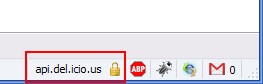
First, you’ll need to visit the URL with your web browser in order to grab the CA certificate. Then, (in Firefox) open up the security details for the site by double-clicking on the padlock icon in the lower right corner:
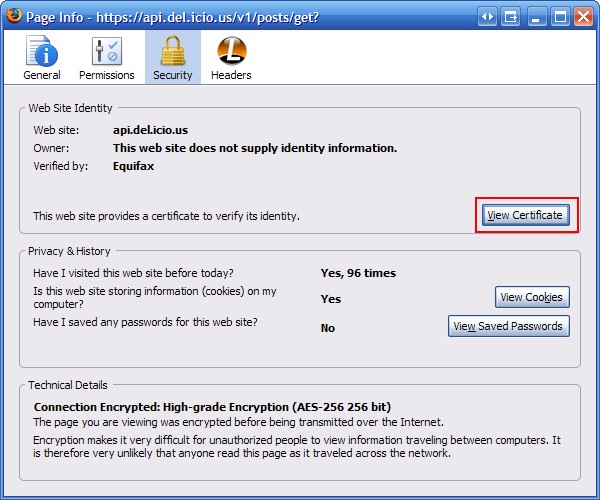
Then click on “View Certificate”:
Bring up the “Details” tab of the cerficates page, and select the certificate at the top of the hierarchy. This is the CA certificate.
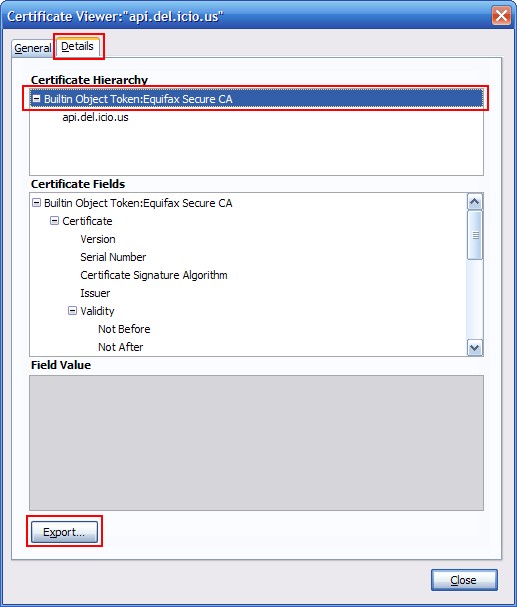
Then click “Export”, and save the CA certificate to your selected location, making sure to select the X.509 Certificate (PEM) as the save type/format.

Now we need to modify the cURL setup to use this CA certificate, with CURLOPT_CAINFO set to point to where we saved the CA certificate file to.
curl_setopt($ch, CURLOPT_SSL_VERIFYPEER, true);
curl_setopt($ch, CURLOPT_SSL_VERIFYHOST, 2);
curl_setopt($ch, CURLOPT_CAINFO, getcwd() . "/CAcerts/BuiltinObjectToken-EquifaxSecureCA.crt");
The other option I’ve included, CURLOPT_SSL_VERIFYHOST can be set to the following integer values:
- 0: Don’t check the common name (CN) attribute
- 1: Check that the common name attribute at least exists
- 2: Check that the common name exists and that it matches the host name of the server
If you have CURLOPT_SSL_VERIFYPEER set to false, then from a security perspective, it doesn’t really matter what you’ve set CURLOPT_SSL_VERIFYHOST to, since without peer certificate verification, the server could use any certificate, including a self-signed one that was guaranteed to have a CN that matched the server’s host name. So this setting is really only relevant if you’ve enabled certificate verification.
This ensures that not just any server certificate will be trusted by your cURL session. For example, if an attacker were to somehow redirect traffic from api.delicious.com to their own server, the cURL session here would not properly initialize, since the attacker would not have access to a server certificate (i.e. would not have the private key) trusted by the CA we added. These steps effectively export the trusted CA from the web browser to the cURL configuration.
More information
If you have the CA certificate, but it is not in the PEM format (i.e. it is in a binary or DER format that isn’t Base64-encoded), you’ll need to use something like OpenSSL to convert it to the PEM format. The exact command differs depending on whether you’re converting from PKCS12 or DER format.
There is a CURLOPT_CAPATH option that allows you to specify a directory that holds multiple CA certificates to trust. But it’s not as simple as dumping every single CA certificate in this directory. Instead, they CA certificates must be named properly, and the OpenSSL c_rehash utility can be used to properly setup this directory for use by cURL.
I’ve been struggling to use CURL to retrieve data from a particular site. Following the instructions in this article has resolved my issue. Many Thanks for taking the time to right this very clear guide.
Thanks! work for me
hi,
i did upload videos from viemo. I did set privacy to all videos. i want to get direct link with token from all vimeo videos in particular users. i have tried php language, with out privacy videos get direct link from all, but i have set privacy link can’t get direct link.
Thank you very much, this is the best explanation about it. I was looking for this answer over 10 hours.
I fix this problem by update php from 5.3.3-22 to 5.3.3-27.
[…] Similar Article […]
I’m having a problem on connecting to a https site, I followed your post but nothing happens still can’t retrieve response from an API. It says “Failed to connect to **************** port 443: Connection timed “
Hi,
the step involving setting CURLOPT_CAINFO does not work (at least on PHP 5.4.4, Debian 7): cURL is unable to validate the chain with the ca-certificates.crt (or ca.pem) file.
It requires instead setting CURLOPT_CAPATH to /etc/ssl/certs/ and letting it picking the right certificate by itself.
This solves the problem.
We have a client that has an app pointing to an old 2003 web cluster where https is not forced and their PHP cUrl app is working fine. We point them to the new 2012 web cluster where all calls a forced to https and the call fails with the following:
Notice: SSL certificate problem: unable to get the local issuer certificate in …….
We implemented the quick fix performed an IIS reset and still see the same issue. Any ideas? I do not have any PHP resources to help me at this time.
Thanks , was the solution to my problem.
Thank you
Listen to this guy. THANK YOU 🙂
“I think, the really really nessecary thing is the Post in comment number 4. You have to choose export option: X.509 Certificate with chain (PEM)”
Thankyou, this worked (with Alberto’s edit)
Thank you very much. That really helped.
Thaks for solve my problem, crack
Thank you!
I have a FreeBSD server
FreeBSD 6.2-RELEASE-p6 FreeBSD 6.2-RELEASE-p6 #0: Sat Jul 21 13:42:25 EDT 2007
On this server I have an application in php using curl which connects to Authorize.net through their api. Recently they updated their SSL certificates to support sha256 and hence the SSL certificate also changed. After this change the application is failing to connecting. If I do a
curl_setopt($ch, CURLOPT_SSL_VERIFYPEER, FALSE)
it connects successfully but I want to go with a full verification of the server during SSL handshake.
I have noted the same gets connected from a different Linux ubuntu server after updating ca certificate file by specifying using CURLOPT_CAINFO option.
But on this FreeBSD, it does not get connected. I have also noted that the SSL certificate is issued on a wildcard character i.e. *.authorize.net. Because of this, on the ubuntu server also, I had to disable CURLOPT_SSL_VERIFYHOST. But on this FreeBSD server, it is simply not working with this option even.
The server is a bit old with php version
PHP 4.4.7 (cgi-fcgi) (built: May 4 2007 13:35:10)
Any help is appreciated.
Error I am getting above is
SSL certificate problem, verify that the CA cert is OK. Details: error:14090086:SSL routines:SSL3_GET_SERVER_CERTIFICATE:certificate verify failed
Thank you.
PHP names these fields ‘button_name_x’ and ‘button_name_y’, while ASP uses a dot. Also, as noted above, be sure to include the ‘__VIEWSTATE’ input field in your post request.
Hi, thank you for this article.
I had some problems with the proper fix.
The certificate at the top of the hierarchy didn’t work for me.
So I chose the second one and everything worked!
Thanks a lot for this article. Saved my time.
Thanks for this tutorial, help me a lot.
I chose the second option and work for me .
Thanks a lot .
many thanks! worked for me!
Thanks a lot for this tutorial.
Nice Work
Ⅰ am not positive ԝҺere уоu’ге ǥetting youur info, Ƅut ǥreat topic.
I must spend ѕome time studying much more or understanding
more. Τhank ʏⲟu fⲟr wonderful information Ⅰ
used tօ Ƅе in search οf tҺіs info fօr my mission.
Also visit mу homepage …
nieng rang
Thanks for this article!
didn’t work for me, great tutorial though!
in my case I still get the same error:
error:14077410:SSL
routines:SSL23_GET_SERVER_HELLO:sslv3 alert handshake failure
in either case.
Hello, thanks for your helpful post! I solved my problem.
But one question: Do I have to put the “cert.crt” file out of the web root directory (for example: in the server root) or good if I put it under my site folder (e.g.:”www.myexamplesite.examp/cert.CRT”) ?
thank you
Hello Mr. Peter,
I can hardly add anything to your favour after all the comments here. As my experience is quite similar too. I had been struggling to cURL a https website but only after going through this page it has been a success. So thank you very much.
The thing is i referred books i have and they said having OpenSSL is enough. Then other noted help sites but it all didn;t help. But you’ve written the requirements so clearly. So your site is sure bookmarked !
Thank you, very useful information!
[…] Berikut tips menggunakan cURL mengakses HTTPS yang disampaikan oleh Peter Chng di blog-nya unitstep.net. […]
[…] see the following well-written guide on downloading the certificate and adjusting the cURL call: UnitStep.net. Here is also a new function using your downloaded certificate (renamed it by adding .crt to the […]
Unknown SSL protocol error in connection to wasl.elm.sa:443
hello, i have this eerror in after get ssl verification, how to solve this error. please give me a solutions.
On linux server,it is ok,but on Windows server,still the problem.
Hi i tried this code but failed to get the details
$options = array(
CURLOPT_RETURNTRANSFER => true, // return web page
CURLOPT_HEADER => false, // don’t return headers
CURLOPT_FOLLOWLOCATION => true, // follow redirects
CURLOPT_ENCODING => “”, // handle all encodings
CURLOPT_USERAGENT => “spider”, // who am i
CURLOPT_AUTOREFERER => true, // set referer on redirect
CURLOPT_CONNECTTIMEOUT => 120, // timeout on connect
CURLOPT_TIMEOUT => 120, // timeout on response
CURLOPT_MAXREDIRS => 10, // stop after 10 redirects
CURLOPT_SSL_VERIFYPEER => true, // Disabled SSL Cert checks
CURLOPT_SSL_VERIFYHOST => 2 , // Disabled SSL Cert checks
CURLOPT_CAINFO => getcwd() .”/targetstudycom.crt” // Disabled SSL Cert checks
);
$ch = curl_init(“https://www.targetstudy.com/school/schools-in-delhi.html”);
curl_setopt_array( $ch, $options );
$content = curl_exec( $ch );
$err = curl_errno( $ch );
$errmsg = curl_error( $ch );
$header = curl_getinfo( $ch );
curl_close( $ch );
$header[‘errno’] = $err;
$header[‘errmsg’] = $errmsg;
$header[‘content’] = $content;
return $header;
above is my code can anyone help me please
[…] Using cURL in PHP to access HTTPS (SSL/TLS) protected sites » unitstep.net […]
Hi
Here’s a way one can automatically generate a list of trusted CA certificates in Windows. You’ll need OpenSSL (or LibreSSL) binaries for this:
@echo offpowershell -Command "Get-ChildItem -Path Cert:\LocalMachine\AuthRoot | Export-Certificate -Filepath c:\path\to\libressl\ca-bundle.p7b -Type P7B"
openssl.exe pkcs7 -in ca-bundle.p7b -inform der -print_certs -text > C:\path\where\php\can\find\TrustedRoot.crt
Schedule this for once a month and put the path into the CURLOPT_CAINFO option. Super handy if you’re using a project that bundles PHPMailer and your Exchange server only speaks TLS and you would rather not turn that off.
Hi please check my answer in StackOverflow, thank you for this page’s author, it helped me a lot to solve my issue! Well, check my answer here: https://stackoverflow.com/a/46138906/3063226
[…] http://unitstep.net/blog/2009/05/05/using-curl-in-php-to-access-https-ssltls-protected-sites/ […]
[…] I am having the same issue, But I been looking into the article maybe it helps you. http://unitstep.net/blog/2009/05/05/using-curl-in-php-to-access-https-ssltls-protected-sites/ […]
[…] for more info, check http://unitstep.net/blog/2009/05/05/using-curl-in-php-to-access-https-ssltls-protected-sites/ […]
Thanks to lets encrypt, you can now enable SSL on PHP websites easily for free. Just install the certificate, configure it and implement redirects.
I’m facing a more or less similar problem.
I’m trying to connect to a Web Service, which requires SSL Certificate pinning. Previous implementation has been done with Java and now I have to convert it to PHP.
I converted the JKS to a pem file and using it like below.
But I’m getting below error.
error:14082174:SSL routines:ssl3_check_cert_and_algorithm:dh key too small
Have anyone faced this issue. Am I doing something wrong or is the Web Service is having some issue.
Really usefull, thank you very much!!
Hi dude, i have also find out one good example
Curl GET And POST Method Calls – PHP Example
Thanks a lot, I have had many problems to understand how was it works, and when I finished reading this article my problem was solved with your this step by step.
Great job man! You helped me a lot.
[…] de la configuration d'un certificat, j'ai suivi les instructions de ce tutoriel et ce tutoriel, en essayant à la fois de télécharger le certificat de la ressource, je suis de […]
Very good explanation. I like.
thx